* 그냥 알고있기
- Vuew Resolver 때문에
@ResponseBody 가 없으면 스프링은 View 를 반환해야한다고 생각한다.
그래서 return 반환값의 이름을 가진 View를(JSP나 HTML) 찾는다.
- DispatcherServlet 은
HTTP 요청이 오면 가장 먼저 사용자 요청을 받아서 HandlerMapping한테 메서드 찾으라고 물어본다.
- HandlerMapping 은
URL, HTTP 메서드를 분석해서 어떤 컨트롤러 메서드로 연결할지 찾고 DispatcherServlet에게 전달한다.
공통
import { ref } from 'vue'
import axios from 'axios'

const id = ref('')
const name = ref('')
const age = ref(0)

const result = ref({
    id: '',
    name: '',
    age: 0
})

------------------------------------------------------------------------------

@Controller
@RequiredArgsConstructor
@RequestMapping("/ex")
public class ExController {

	@GetMapping("/ex.html")
	public String ex() {

		return "ex/ex";
	}
- POST / w-xxx 요청
const submitData1 = async () => {
    const params = new URLSearchParams()
    params.append('id', id.value)
    params.append('name', name.value)
    params.append('age', age.value.toString())

    try {
        const res = await axios.post('../ex/ex1.do', params, {
            headers: {
                'Content-Type': 'application/x-www-form-urlencoded'
            }
        })
        result.value = res.data
    } catch (err) {
        console.error('요청 실패1:', err)
    }
};

------------------------------------------------------------------------------

	@ResponseBody
	@PostMapping("/ex1.do")
	public ExDto doEx1(@RequestParam String name, String id, int age) {
		// x-www-form-urlencoded 형식으로 보내서 출력
		ExDto dto = new ExDto();

		dto.setAge(age + 1);
		dto.setName(name);
		dto.setId(id);

		System.out.println(dto + "나이+1");
		return dto;
	}
- GET / query param 요청
const submitData2 = async () => {
    const params = new URLSearchParams()
    params.append('id', id.value)
    params.append('name', name.value)
    params.append('age', age.value.toString())

    try {
        const res = await axios.get("../ex/ex2.do", {params})
        result.value = res.data
    } catch (err) {
        console.error('요청 실패2:', err)
    }
};

------------------------------------------------------------------------------

	@ResponseBody
	@GetMapping("/ex2.do")
	public ExDto doEx3(@ModelAttribute ExDto exDto) {
		// x-www- 형식이고, 세 매개변수를 하나로 합침. 그리고 Get
		exDto.setAge(exDto.getAge() + 2);

		System.out.println(exDto + "나이+2");
		return exDto;
	}
- POST / JSON 요청
const submitData3 = () => {
    const params = {
        id: id.value,
        name: name.value,
        age: age.value,
    }
    axios.post("../ex/ex3.do", params, {
        headers: {"Content-Type": "application/json"}
    })
        .then(res => {
            result.value = res.data
        })
}

------------------------------------------------------------------------------

	@ResponseBody
	@PostMapping("/ex3.do")
	public ExDto doEx2(@RequestBody ExDto exDto) {
		// JSON 으로 보내서 출력
		exDto.setAge(exDto.getAge() + 3);
		exDto.setId(exDto.getId() + "아이디");
		System.out.println(exDto+ "나이+3");
		return exDto;
	}
- POST / w-xxx 요청 / AllArgsConstructor
const submitData4 = async () => {
    const params = new URLSearchParams()
    params.append('id', id.value)
    params.append('name', name.value)
    params.append('age', age.value.toString())

    try {
        const res = await axios.post('../ex/ex4.do', params, {
            headers: {
                'Content-Type': 'application/x-www-form-urlencoded'
            }
        })
        result.value = res.data
    } catch (err) {
        console.error('요청 실패:', err)
    }
}

------------------------------------------------------------------------------

	@ResponseBody
	@PostMapping("/ex4.do")
	public ExDto doEx4(@ModelAttribute ExDto exDto) {
		// x-www & AllArgsConstructor 이용해서 한 번에 dto에 값 세팅
		int agePlus = exDto.getAge() + 4;
		ExDto dto = new ExDto(exDto.getName(), exDto.getId(), agePlus);

		System.out.println(dto + "나이+4");
		return dto;
	}
- POST / w-xxx 요청 / NoArgsConstructor
const submitData5 = () => {
    const params = new URLSearchParams()
    params.append('id', id.value)
    params.append('name', name.value)
    params.append('age', age.value.toString())

    try {
        const res = axios.post('../ex/ex5.do', params, {
            headers: {
                'Content-Type': 'application/x-www-form-urlencoded'
            }
        })
            .then(res => {
                result.value = res.data
            })
    } catch (err) {
        console.error('요청 실패:', err)
    }
}

------------------------------------------------------------------------------

	@ResponseBody
	@PostMapping("/ex5.do")
	public ExDto doEx5(@ModelAttribute ExDto exDto) {
		// x-www & NoArgsConstructor 이용해서 각각 set();
		int agePlus = exDto.getAge() + 5;

		ExDto dto = new ExDto();
		dto.setName(exDto.getName());
		dto.setId(exDto.getId());
		dto.setAge(agePlus);

		System.out.println(dto + "나이+5");
		return dto;
	}
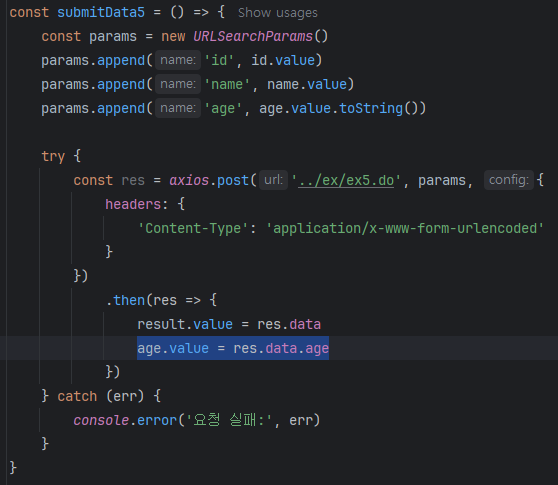
만약 이런식으로 age.value 값을 응답받은 값으로 초기화하면
버튼을 클릭할 때마다 숫자가 + 된다.
그냥 result.value = res.data 만 할 경우
클라이언트가 입력한 값 (age.value)은 변하지 않으므로 계속 같은 값이 가고 -> res.data도 그대로 -> result.value도 그대로
만약 return 타입이 Dto가 아니라 String 이거나 int라면
단일 값을 주고받는다.
const age = ref(0);

const submitData = () => {
    const params = new URLSearchParams()
    params.append('age', age.value.toString())

    axios.get("../ex/dan.do", {
        params: params,
        headers: {
            'Content-Type': 'application/x-www-form-urlencoded'
        }})
        .then(res => {
            age.value = res.data
        })
}

------------------------------------------------------------------------------

@Controller
@RequestMapping("/ex")
public class DanController {

	@GetMapping("/dan.html")
	public String dandan() {
		return "ex/dan";
	}

	@ResponseBody
	@GetMapping("/dan.do")
	public int dan(@RequestParam int age) {
		int ageNew = age + 1;

		return ageNew;
}'웹 개발 > 개념 정리' 카테고리의 다른 글
| [디자인패턴] MVC, MVP, MVVM 이란 무엇인가 (0) | 2025.11.12 |
|---|---|
| [WebOrder] JSON 객체로 보내고 받기 (0) | 2025.10.28 |
| 파라미터 / JSON 요청(2)에 따른 컨트롤러 ~ 와 제네릭 간단 설명 (4) | 2025.08.01 |
| @RequiredArgsConstructor (0) | 2025.06.17 |
| resultType= DTO / MAP 차이 (0) | 2025.06.17 |