사실 Ramda는 몰라서 그냥 조금 찾아본 거고~
lodash 사용법을 더 열심히 찾아서 썼다.
1. Ramda
: 오픈소스 자바스크립트 라이브러리
: lambda (람다식)와는 상관 없다.
1-1 람다 패키지 불러오기
import * as R from "ramda"
보통 ramda 패키지를 불러와서 R이라는 심벌로 사용한다.
(rambda 는 간단하게 사용할 수 있는 ramda의 축소판)
1-2 예제 실습
1) range()
ex) 1부터 9까지 연속된 숫자 배열을 생성
R.range(최솟값, 최대값)import * as R from 'ramda'
console.log(
R.range(1, 9 + 1) // [1, 2, 3, 4, 5, 6, 7, 8, 9]
)
2) tap()
디버깅용 확인 함수. 현재 값을 파악할 수 있다.
console.log 를 써도 디버깅할 수 있는데
R.pipe 안에서는 console.log 문을 직접 사용할 수 없으므로 반드시 R.tap 함수를 사용해야 한다.
ex)
R.tap(콜백함수)(배열)import * as R from 'ramda'
const numbers: number[] = R.range(1, 9 + 1)
R.tap(n => console.log(n))(numbers) // [1, 2, 3, 4, 5, 6, 7, 8, 9]
3) pipe()
ex)
import * as R from 'ramda'

const array: number[] = R.range(1, 10)
R.pipe(
  R.tap(n => console.log(n)) // [ 1, 2, 3, 4, 5, 6, 7, 8, 9  ]
)(array)
pipe(
fn1,
fn2,
fn3
)(data)
pipe, tap 동시 사용 예
pipe(
  map(x => x + 1),
  tap(x => console.log("map 후:", x)),
  filter(x => x > 5),
  tap(x => console.log("filter 후:", x))
)(numbers);
map : 값 변환
filter : 조건 판단
tap : 값 확인
4) 사칙 연산 함수
R.add(a: number)(b: number) // a + b
R.subtract(a: number)(b: number) // a - b
R.multiply(a: number)(b: number) // a * b
R,divide(a: number)(b: number) // a / b
import * as R from 'ramda'

const incNumbers = R.pipe(
  R.map(R.add(1)),
  R.tap(a => console.log('after add(1):', a)), // after add(1): [ 2, 3, 4, 5, 6, 7, 8, 9, 10  ]
)
const newNumbers = incNumbers(R.range(1, 9 + 1))
참조 페이지
2. lodash
: 오픈소스 자바스크립트 라이브러리
: '_' 기호를 이용해서 사용하기 때문에 이름도 lodash
아래 글 작성 참고
collection : 배열 또는 객체
iteratee : 누적 계산 함수
accumulator : 초기값
1) findindex()
: 배열 내에서 원하는 index 추출
// 형식
_.findindex(array,[predicate=.indentity],[thisArg])

//출력
index number
var myFriend = [
{name:'kys',job:'developer',age:27},
{name:'cys',job:'webtoons man',age:27},
{name:'yhs',job:'florist',age:26},
{name:'chj',job:'nonghyup man',age:27},
{name:'ghh',job:'coffee man',age:27},
{name:'ldh',job:'kangaroo father',age:27},
{name:'hsy',job:'monk',age:27},
];
// 콜백함수를 통해 나이가 26인 객체가 처음으로 나오는 index 반환
_.findIndex(myFriend, function(friend) {
return friend.age === 26;
});
// -> 2
// 처음 일치하는 object의 index 값을 반환합니다.
_.findIndex(myFriend, { name: 'cys', job:'webtoons man',age: 27 });
// -> 1
// 나이가 26인 객체가 처음으로 나오는 index 반환
_.findIndex(myFriend, age: 27);
// → 0
2) remove()
: 배열 내의 조건에 맞는 요소들을 제거한 후 반환
// 형식
.remove(array, [predicate=.identity], [thisArg])

//출력
제거된 array
var array=[1,2,3,4];
var evens=remove(array,function(n){
return n%2==0;
});
console.log(array);
//-> [1,3]
console.log(evens);
//-> [2,4]
3) find()
: 조건을 만족하는 컬렉션에서의 첫 번째 요소
// 형식
.find(collection, [predicate=.identity], [thisArg])
var myFriend=[
{name:'kys',job:'developer',age:27},
{name:'cys',job:'webtoons man',age:27},
{name:'yhs',job:'florist',age:26},
{name:'chj',job:'nonghyup man',age:27},
{name:'ghh',job:'coffee man',age:27},
{name:'ldh',job:'kangaroo',age:27},
]
// 콜백함수가 처음으로 참이되는 객체를 반환
_.find(myFriend, function(friend) {
return friend.age < 28;
});
// → { name: 'kys',job:'developer' ,'age': 27}
4) filter()
: 특정 조건을 만족하는 모든 요소를 추출
// 형식
.filter(collection, [predicate=.identity], [thisArg])
var myFriend=[
{name:'kys',job:'developer',age:27},
{name:'cys',job:'webtoons man',age:27},
{name:'yhs',job:'florist',age:26},
{name:'chj',job:'nonghyup man',age:27},
{name:'ghh',job:'coffee man',age:27},
{name:'ldh',job:'kangaroo',age:27},
]
// 입력한 object의 key와 value들을 모두 포함하는 객체들을 배열로 반환합니다.
_.filter(myFriend, { age: 26, job: 'florist' });
// → [{ name: 'yhs',job:'florist', age: 26}]
// 입력한 key값이 true인 객체들을 배열로 반환합니다.
_.filter(myFriend, friend=>friend.age==26);
// → [{ name: 'yhs',job:'florist', age: 26}]
5) map()
: 계산 결과 배열 함수를 실행하고 그 결과를 배열로 반환.
: key값을 입력할 경우 해당 key값들만 간추려서 반환.
// 형식
.map(collection, [iteratee=.identity], [thisArg])
function timesTwo(n) {
return n * 3;
}
_.map([1,2],timesTwo);
//->[3,6]
var myFriend=[
{'name':'kys'},
{'name':'cys'},
];
.map(myFriend,'name');
//->['kys','cys']
6) foreach()
: 배열의 값마다 함수를 실행시킬 때 사용
: 배열용.
// 형식
.forEach(collection, [iteratee=.identity], [thisArg])
_([1, 2]).forEach(function(n) {
console.log(n);
}).value();
// 1
// 2
쉬운 예제
_.forEach([10, 20], (value, index) => {
  console.log(index, value);
});

// 0 10
// 1 20
7) includes()
: collection에 target 값이 있는지 판별
// 형식
_.includes(collection, target, [fromIndex=0])
// 배열에 값이 있는지 찾습니다.
_.includes([1, 2, 3], 1);
// → true
// index에 해당 값이 있는지 찾습니다.
_.includes([1, 2, 3], 1, 2);
// → false
// 일치하는 값이 있는지 찾습니다.
_.includes({ 'name': 'yhs', 'age': 26 }, 'yhs');
// → true
// 일치하는 값이 문자열 안에 있는지 찾습니다.
_.includes('dontknow', 'ont');
// → true
8) reduce()
: 첫 번째 인자에 대해 배열 내부의 값을 통해 콜백함수를 실행시킨 후 결과값 반환
: 반복해서 누적하며 하나로 만듦. 배열을 하나의 값으로 줄이는 함수.
// 형식
.reduce(collection, [iteratee=.identity], [accumulator], [thisArg])
합계
_.reduce([1, 2], function(total, n) {
  return total + n;
});
// → 3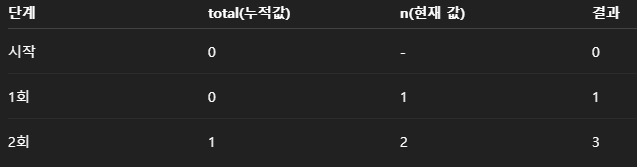
[1] 숫자 바구니 하나를 준비하고 (0)
[2] 1을 넣어서 더하고
[3] 거기에 2를 더하고
[4] 마지막 total 값 반환.
객체 만들기
const arr = [
  { id: 1, name: "A" },
  { id: 2, name: "B" }
];

_.reduce(arr, (acc, cur) => {
  acc[cur.id] = cur.name;
  return acc;
}, {});

// → { 1: "A", 2: "B" }
[1] acc = {}
[2] acc[1] = "A" // { 1 : "A" }
[3] acc[2] = "B" // { 1 : "A", 2 : "B" }
[4] 반
* cur은 지금 보고 있는 것.
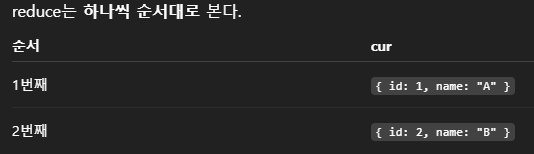
* acc 는 결과 모아두는 곳.
acc[cur.id] = cur.name;
acc[1] = "A";
9) forOwn()
: 객체의 own property만 순회.
: 객체 전용.
: for ...in 의 lodash 버전.
: Object.keys().forEach() 대신 사용.
// 형식
_.forOwn(object, iteratee)
const obj = {
a: 1,
b: 2
};
_.forOwn(obj, (value, key) => {
console.log(key, value);
});
// → a 1
// → b 2
10) groupBy()
: 배열을 기준값으로 묶어서 객체로 만듦
: reduce 의 가독성 좋은 버전.
// 형식
_.groupBy(collection, iteratee)
숫자 홀짝
_.groupBy([1, 2, 3, 4], n => n % 2);

// → { 0: [2, 4], 1: [1, 3] }
객체 배열 그룹핑
const users = [
  { name: "A", role: "admin" },
  { name: "B", role: "user" },
  { name: "C", role: "admin" }
];

_.groupBy(users, "role");
// 결과
{
  admin: [
    { name: "A", role: "admin" },
    { name: "C", role: "admin" }
  ],
  user: [
    { name: "B", role: "user" }
  ]
}
실제 사용 예제
(WebOrder 프로젝트)
- lodash 없이 배열을 foreach 이용하여 순회
masterSeq 별로 직접 enumMap (바구니) 만들고
key/value 를 차곡차곡 넣음
즉, 수동 groupBy + 가공
빈값 추가 등 특수 조건 넣기에 용이하지만
가독성 떨어지는 단점이 있다고 함. (GPT..)
// Item.vue
const loadCodeDetail = () => {
    const payload = { masterCodes : [1,2,5,60] };

    doRequestJson("post", "../../common/codeHelp/getDetailCodeHelpMultipleList.do", payload)
        .then(res => {
            const list = res.data.codeListD;

            const enumMap = {};
            list.forEach(i => {
                if (!enumMap[i.masterSeq]) {
                    enumMap[i.masterSeq] = { keys: [], values: [] };

                    // itemSpec 은 NUll허용이라 빈값 추가.
                    if (i.masterSeq === 60) {
                        enumMap[i.masterSeq].keys.push("");
                        enumMap[i.masterSeq].values.push("");
                    }
                }
                enumMap[i.masterSeq].keys.push(i.detailSeq);
                enumMap[i.masterSeq].values.push(sheetLocale === "ko" ? i.codeName : i.codeEngName);
            });

            Object.keys(enumMap).forEach(masterSeq => {
                let colName;
                switch(masterSeq) {
                    case "1": colName = "itemType"; break;
                    case "2": colName = "itemStatus"; break;
                    case "5": colName = "itemUnit"; break;
                    case "60": colName = "itemSpec"; break;
                }

                const e = enumMap[masterSeq];
                sheet1.setAttribute(null, colName, "Enum", "|" + e.values.join('|'));
                sheet1.setAttribute(null, colName, "EnumKeys", "|" + e.keys.join('|'));
            });
            loadItemCategory();
        });
};
- lodash 사용
(언어별 필드 매핑도 있음 locale.)
데이터를 groupBy 묶고
묶음 단위로 Enum을 만들고
규칙에 따라 컬럼에 세팅
// Customer.vue
const setSheetEnum = () => {

    let arrays = {
        masterCodes: [3, 54]
    }

    doRequestJson("post",  "../../common/codeHelp/getDetailCodeHelpMultipleList.do", arrays)
        .then(result => {
            const list = result.data.codeListD
            consoleLog("공통 코드 조회 getDetailCodeHelpMultipleList : ", list);

            const grouped = _.groupBy(list, "masterSeq")
            consoleLog("lodash로 masterCode별로 발라내기 : ", grouped)

            const columnMapping = {
                3: "custStatus",
                54: "currency"
            };

            // 언어별 필드 매핑
            const langFieldMap = {
                ko: "codeName",
                en: "codeEngName"
            };

            _.forOwn(grouped, (items, masterSeq) => {
                const colName = columnMapping[masterSeq];
                if (!colName) return;

                // 통화(54)일 경우 언어와 관계없이 codeNickName 사용
                const field = Number(masterSeq) === 54 ? "codeNickName" : (langFieldMap[selectedLanguage] || langFieldMap["ko"]);

                const enums = "|" + _.map(items, field).join("|");
                const enumKeys = "|" + _.map(items, "detailSeq").join("|");

                sheetInstance.setAttribute(null, colName, "Enum", enums);
                sheetInstance.setAttribute(null, colName, "EnumKeys", enumKeys);
            });

            // sheet에 Enum 세팅이 끝나고 거래처 목록 조회
            getCustomerList();
        })
        .catch(error => {
            consoleLog("getDetailCodeHelpMultipleList", error);
        })
}
나는 lodash 를 제대로 공부해본 적이 없어서
일단 forEach 를 계속 쓰기로 했다.
언어 매핑도 어차피 kr, en 두 가지만 쓸 거라 삼항연산자 그대로 두기로 했다.
다만 switch 문만... 리팩토링을 조금 해보기로 했다.
const columnMap = {
    "1": "itemType",
    "2": "itemStatus",
    "5": "itemUnit",
    "60": "itemSpec",
}
forEach 내부에서 masterSeq값에 따라 switch 문으로 컬럼명을 하나씩 분기처리 하던 방식에서
컬럼명 매핑 객체 columnMap을 별도로 정의하고
이후 forEach 에서는
const colName = columnMap[masterSeq];
이렇게 매핑 객체를 통해 컬럼명을 조회하도록 변경했다.
근데
SetItems 에서는 내가 Object.entries 썼네.
Object.entries(colMap).forEach(([masterSeq, colName]) => {
    const e = enumMap[Number(masterSeq)];
    if (!e) return;

    targetSheet.setAttribute(null, colName, "Enum", "|" + e.values.join("|"));
    targetSheet.setAttribute(null, colName, "EnumKeys", "|" + e.keys.join("|"));
});
이렇게도 가능하다.
Object.keys(enumMap).forEach(masterSeq => {
    const colName = columnMap[masterSeq];
이 한 줄 줄일 수 있다.
'기타' 카테고리의 다른 글
| [AI] 인공지능, 머신러닝, 딥러닝 차이 (0) | 2026.03.04 |
|---|---|
| 개발자 취업 및 이직을 위한 필수 채용 사이트 TOP5 (0) | 2026.02.03 |
| [특수문자] 화살표 모음 (0) | 2025.11.12 |
| [Git] Brity 파일 Git 연동 (4) | 2025.08.04 |
| [Git] 외장톰캣 배포 시 war 설정, 브랜치 생성, Jenkins 파이프라인 (4) | 2025.08.01 |