- Vue3 CompositionAPI
공식 API 홈페이지 주소는 아래와 같다.
http://postcode.map.daum.net/guide
Daum 우편번호 서비스
우편번호 검색과 도로명 주소 입력 기능을 너무 간단하게 적용할 수 있는 방법. Daum 우편번호 서비스를 이용해보세요. 어느 사이트에서나 무료로 제약없이 사용 가능하답니다.
postcode.map.daum.net
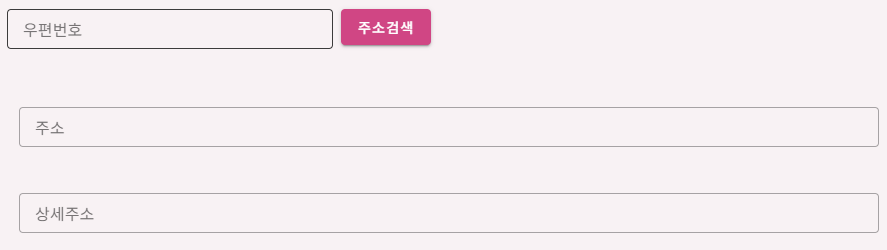
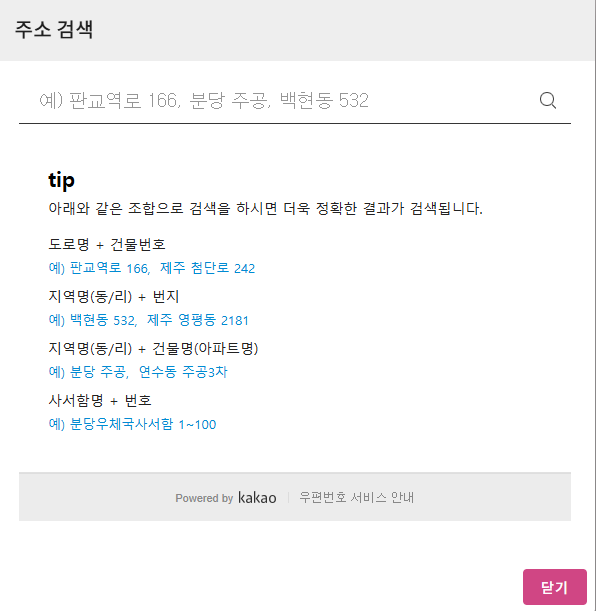

포인트는
1.
import {VueDaumPostcode} from "vue-daum-postcode";
2.
<VueDaumPostcode @complete="onComplete" />
3. @complete 는 DaumPostCode에서 만든 이벤트
<VueDaumPostcode @complete="onComplete" />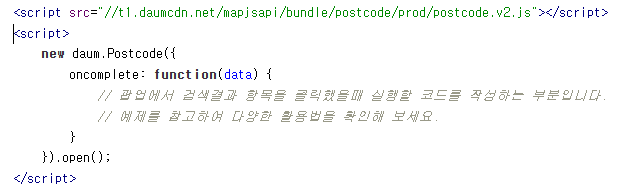
원래 onComplete 인데, vue에서 @로 on을 대신할 수 있기 때문에 @complete 로 사용한다
DaumPostDialog.vue
<template>
    <v-dialog v-model="isOpen" width="600px">
        <v-card>
            <v-toolbar>
                <v-toolbar-title class="text-h6" color="dialogHeader">
                    주소 검색
                </v-toolbar-title>
            </v-toolbar>
            <v-card-text style="height:500px; overflow-y: auto;">
                <VueDaumPostcode @complete="onComplete" />
            </v-card-text>
            <v-card-actions>
                <v-spacer/>
                <v-btn color="primary" variant="flat" @click="close">
                    닫기
                </v-btn>
            </v-card-actions>
        </v-card>
    </v-dialog>
</template>


<script setup>
import {VueDaumPostcode} from "vue-daum-postcode";
import {ref} from "vue";

const isOpen = ref(false);

// dialog 열기
const open = () => {
    isOpen.value = true;
}

// 닫기
const close = () => {
    isOpen.value = false;
}

// 주소 선택 -> 결과 부모한테 전달
const onComplete = (address) => {
    emit("selected", address);
    close();
}

const emit = defineEmits(["selected"])

defineExpose({
    open,
})
</script>
// dan.vue (ExTest프로젝트)
<template>
    <v-app>
        <v-main>
            <v-container>
                <v-form ref="formRef" v-model="isValid">
                    <v-row>
                        <v-col cols="12" sm="3" class="d-flex">
                            <v-text-field
                                v-model="form.postCode"
                                label="우편번호"
                                clearable
                                density="compact"
                                variant="outlined"
                            >
                            </v-text-field>
                            <v-btn @click="openPostCodeDialog" color="primary" class="ml-2">
                                주소검색
                            </v-btn>
                        </v-col>
                    </v-row>
                    <v-row>
                        <v-col>
                            <v-col cols="12" sm="6">
                                <v-text-field
                                    v-model="form.address"
                                    label="주소"
                                    density="compact"
                                    variant="outlined"
                                    clearable/>
                            </v-col>
                            <v-col cols="12" sm="6">
                                <v-text-field
                                    v-model="form.addressDetail"
                                    label="상세주소"
                                    density="compact"
                                    variant="outlined"
                                    clearable/>
                            </v-col>
                        </v-col>
                    </v-row>
                </v-form>
            </v-container>
        </v-main>
        <DaumPostCodeDialog ref="postCodeDialogRef" @selected="onComplete" />
    </v-app>
</template>


<script setup>
import {ref} from 'vue'
import axios from "axios";
import DaumPostCodeDialog from "@/components/DaumPostCodeDialog.vue";

// 주소 검색
const postCodeDialogRef = ref();


const defaultForm = {
    postCode: "",
    address: "",
    addressDetail: ""
}

const form = ref({...defaultForm});
const isValid = ref(false);
const formRef = ref(null);

// 주소 검색.
const openPostCodeDialog = () => {
    postCodeDialogRef.value.open();
}


const onComplete = (data) => {
    form.value.postCode = data.zonecode;
    form.value.address = data.userSelectedType === "R" ? data.roadAddress : data.jibunAddress;
    form.value.addressDetail = "";
}
</script>

<style scoped>

</style>'웹 개발 > Vue' 카테고리의 다른 글
| [Vue3] shallowRef (ref와의 차이) (0) | 2025.12.30 |
|---|---|
| [Vue3] emit, props (0) | 2025.09.29 |
| [Vue3][wikibook] 4. Vue3 시작을 위한 기초 학습 (0) | 2025.08.07 |
| [Vue3] optionsAPI / compositionAPI(script setup) 비교 예제 (0) | 2025.08.07 |
| [Vue3][wikibook] 1. Vue 소개 (3) | 2025.08.06 |