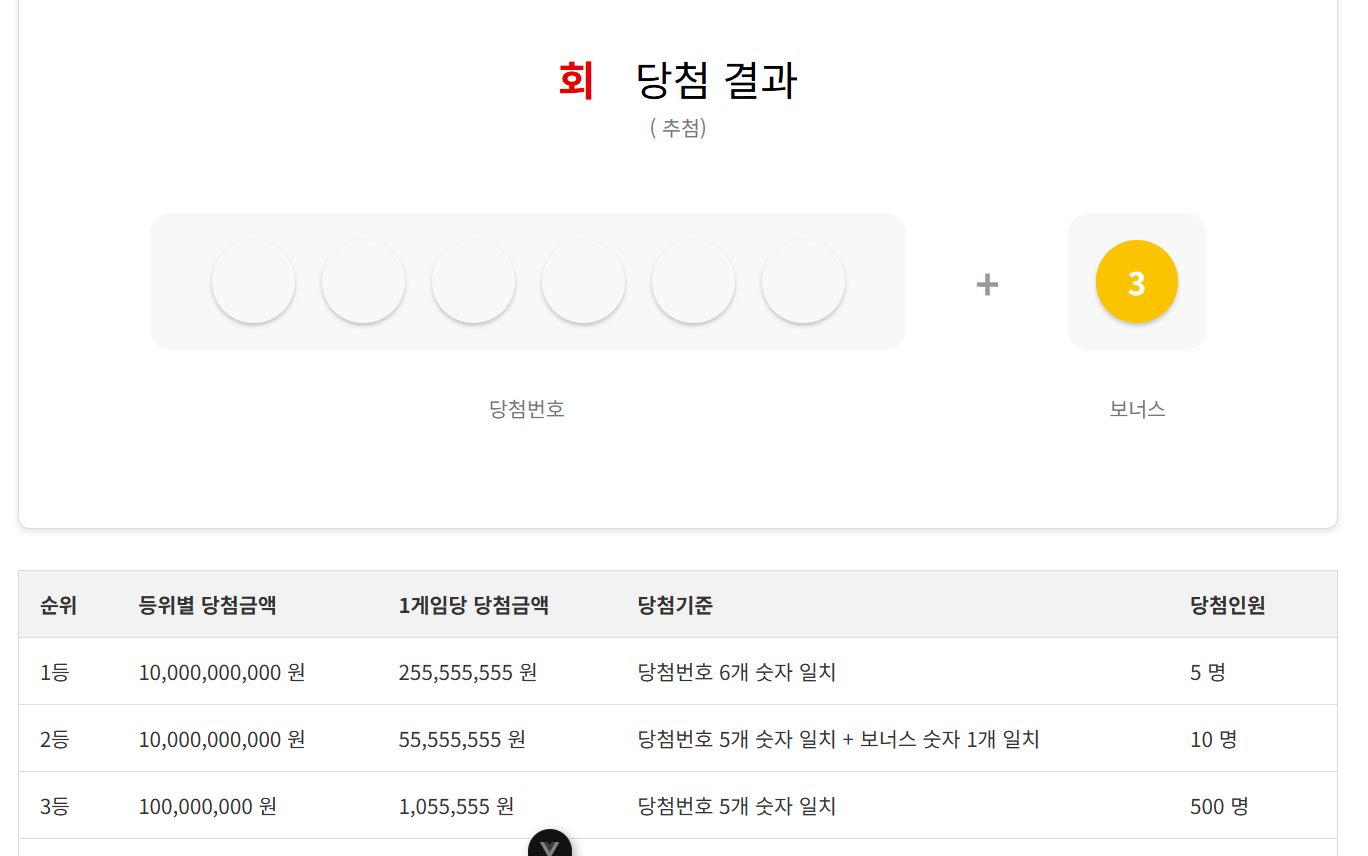
const prizeDetails = ref([
    {rank: '1등', totalPrize: 10000000000, perGamePrize: 255555555, criteria: '당첨번호 6개 숫자 일치', winners: 5},
    {
        rank: '2등',
        totalPrize: 10000000000,
        perGamePrize: 55555555,
        criteria: '당첨번호 5개 숫자 일치 + 보너스 숫자 1개 일치',
        winners: 10
    },
    {rank: '3등', totalPrize: 100000000, perGamePrize: 1055555, criteria: '당첨번호 5개 숫자 일치', winners: 500},
    {rank: '4등', totalPrize: 10000000, perGamePrize: 55555, criteria: '당첨번호 4개 숫자 일치', winners: 10000},
    {rank: '5등', totalPrize: 1000000, perGamePrize: 5555, criteria: '당첨번호 3개 숫자 일치', winners: 300000},
]);
이런식으로 정적 데이터 넣어서 출력해보고
실 DB 를 넣게 바꾼다.
const prizeDetails = ref([]);
빈배열로 변경하면서 onMounted 내부에 선언한 것을 외부로 옮긴다.
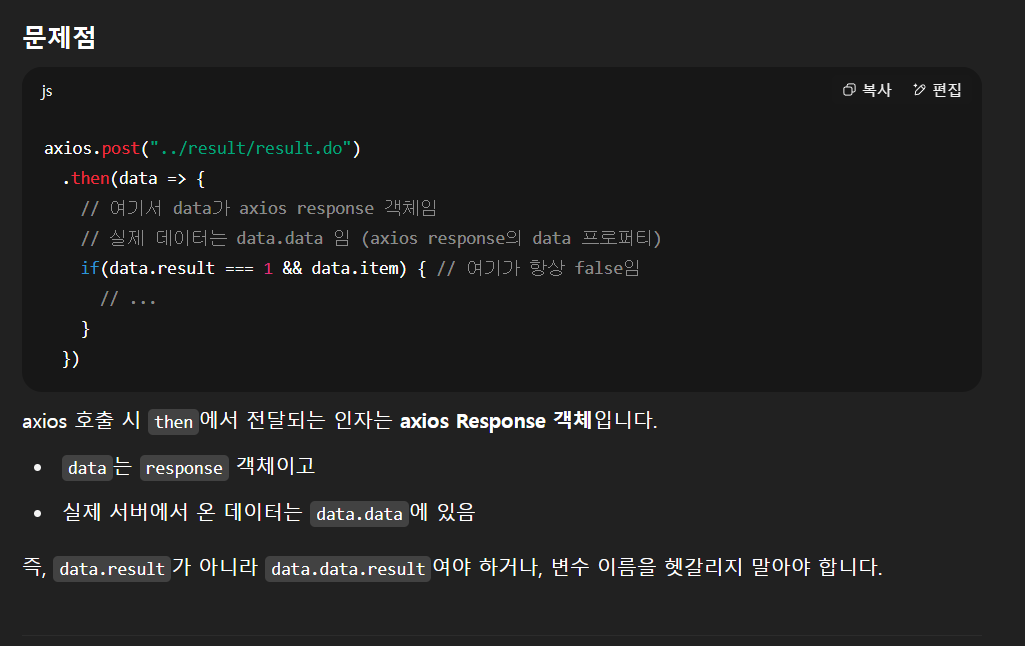


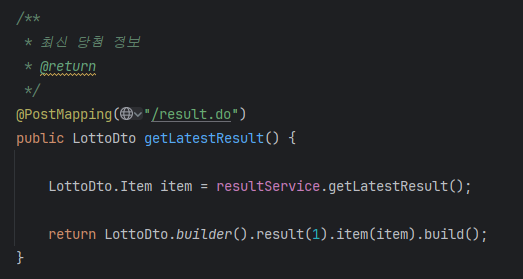
이렇게 item을 보냈는데 말이죠.
axios 가 받을 때 response의 data로 받는다고 합니다.

-------------------
뭔 소린지 모르겠어 나중에 시간될 때 다시 공부를 해봐야지 일단 구현은 했는데 혼자선 절대 못 짜 큰일이다
common.vue 로 헤더랑 사이드바는 따로 컴포넌트 만들어서 빼고 참조하는 형태임
<template>
    <div class="container">
        <div class="main-wrapper" :class="{ 'sidebar-active': isSidebarOpen }">
            <Common
                v-model:active-menu-item="activeMenuItem"
                v-model:isSidebarOpen="isSidebarOpen"
                @menu-selected="selectMenuItem"
            />

            <main class="main-content">
                <select v-model="selectedRound" style="margin: 0 auto; text-align: center; width: 100px; border: 1px solid #555;">
                    <option v-for="r in roundList" :key="r" :value="r">{{ r }}회</option>
                </select>
                <div class="draw-results">
                    <div class="draw-title-line">
                        <span class="round1"><span class="round2">{{ round }}회</span> 당첨 결과</span>
                    </div>
                    <p>({{ date }} 추첨)</p>
                    <div class="lotto-numbers">
                        <div class="numbers-main">
                            <span v-if="num1 !== null" :class="['number-circle', getNumberColor(num1)]">{{ num1 }}</span>
                            <span v-if="num2 !== null" :class="['number-circle', getNumberColor(num2)]">{{ num2 }}</span>
                            <span v-if="num3 !== null" :class="['number-circle', getNumberColor(num3)]">{{ num3 }}</span>
                            <span v-if="num4 !== null" :class="['number-circle', getNumberColor(num4)]">{{ num4 }}</span>
                            <span v-if="num5 !== null" :class="['number-circle', getNumberColor(num5)]">{{ num5 }}</span>
                            <span v-if="num6 !== null" :class="['number-circle', getNumberColor(num6)]">{{ num6 }}</span>
<!--                            <span :class="['number-circle', getNumberColor(num2)]">{{ num2 }}</span>-->
<!--                            <span :class="['number-circle', getNumberColor(num3)]">{{ num3 }}</span>-->
<!--                            <span :class="['number-circle', getNumberColor(num4)]">{{ num4 }}</span>-->
<!--                            <span :class="['number-circle', getNumberColor(num5)]">{{ num5 }}</span>-->
<!--                            <span :class="['number-circle', getNumberColor(num6)]">{{ num6 }}</span>-->
                        </div>
                        <span class="plus-sign">+</span>
                        <div class="numbers-bonus">
                          <span :class="['number-circle', getNumberColor(bonus)]">
                            {{ bonus }}
                          </span>
                        </div>
                    </div>
                    <div class="labels-container">
                        <p class="label">당첨번호</p>
                        <p class="bonus-label">보너스</p>
                    </div>
                </div>

                <div class="prize-table">
                    <table>
                        <thead>
                        <tr>
                            <th class="center">순위</th>
                            <th class="center">등위별 총 당첨 금액</th>
                            <th class="center">당첨 게임</th>
                            <th class="center">1게임당 당첨 금액</th>
                            <th class="center">당첨 기준</th>
                        </tr>
                        </thead>
                        <tbody>
                        <tr v-for="(prize, index) in prizeDetails" :key="index">
                            <td class="center">{{ prize.rank }}</td>
                            <td class="right">{{ formatCurrency(prize.totalPrize) }} 원</td>
                            <td class="center">{{ formatNumber(prize.winners) }}</td>
                            <td class="right">{{ formatCurrency(prize.perGamePrize) }} 원</td>
                            <td class="center">{{ prize.criteria }}</td>
                        </tr>
                        </tbody>
                    </table>
                </div>
            </main>
        </div>
    </div>
</template>

<script setup>
import {ref, onMounted, watch} from 'vue';
import Common from "@/components/common/common.vue";
import axios from "axios";

const activeMenuItem = ref('');
const isSidebarOpen = ref(true);

const round = ref('');
const date = ref('');
const num1 = ref(null);
const num2 = ref(null);
const num3 = ref(null);
const num4 = ref(null);
const num5 = ref(null);
const num6 = ref(null);
const bonus = ref(null);
const prizeDetails = ref([]);

const roundList = ref([]); // 전체 회차 목록
const selectedRound = ref(null);      // 선택된 회차

const selectMenuItem = (menuText) => {
    activeMenuItem.value = menuText;
};

watch(activeMenuItem, (newValue) => {
    localStorage.setItem('activeMenuItem', newValue);
});

function formatNumber(value) {
    if (typeof value !== 'number') return value
    return value.toLocaleString()
}


onMounted(() => {
    getRound();

    const savedActiveMenuItem = localStorage.getItem('activeMenuItem');
    if (savedActiveMenuItem) {
        activeMenuItem.value = savedActiveMenuItem;
    } else {
        activeMenuItem.value = '회차별 당첨 번호';
    }
});

const getNumberColor = (number) => {
    if (!number) return '';
    if (number >= 1 && number <= 10) return 'yellow';
    if (number >= 11 && number <= 20) return 'blue';
    if (number >= 21 && number <= 30) return 'red';
    if (number >= 31 && number <= 40) return 'gray';
    if (number >= 41 && number <= 45) return 'green';
    return '';
};

const formatCurrency = (amount) => {
    return amount.toString().replace(/\B(?=(\d{3})+(?!\d))/g, ',');
};

watch(selectedRound, (newRound, oldRound) => {
    if (newRound && newRound !== oldRound) {
        loadRoundData(newRound);
    }
});

// 회차 목록 불러오기
const getRound = () => {
    console.log("회차불러오기!!!!!!!!!!!!!!!!!!!!!!!!!!!!!!!!!!")
    axios.get("../result/roundList.do").then(res => {
        roundList.value = res.data;
        selectedRound.value = roundList.value[0];

    });

    const savedActiveMenuItem = localStorage.getItem('activeMenuItem');
    if (savedActiveMenuItem) {
        activeMenuItem.value = savedActiveMenuItem;
    } else {
        activeMenuItem.value = '회차별 당첨 번호';
    }
}

function loadRoundData(selectRound) {
    axios.post("../result/result.do", { selectRound })
        .then(response => {
            const data = response.data;
            if (data.result === 1 && data.item) {
                const item = data.item;
                round.value = item.round;
                date.value = new Date(item.date).toISOString().substring(0, 10);
                num1.value = item.num1;
                num2.value = item.num2;
                num3.value = item.num3;
                num4.value = item.num4;
                num5.value = item.num5;
                num6.value = item.num6;
                bonus.value = item.bonus;

                prizeDetails.value = [
                    {
                        rank: '1등',
                        totalPrize:  Math.floor(item.firstPrizeLong * item.firstWinnerCount),
                        perGamePrize: item.firstPrizeLong,
                        criteria: '당첨번호 6개 숫자 일치',
                        winners: item.firstWinnerCount
                    },
                    {
                        rank: '2등',
                        totalPrize: Math.floor(item.secondPrizeLong * item.secondWinnerCount),
                        perGamePrize: item.secondPrizeLong,
                        criteria: '당첨번호 5개 숫자 일치 + 보너스 숫자 1개 일치',
                        winners: item.secondWinnerCount
                    },
                    {
                        rank: '3등',
                        totalPrize: Math.floor(item.thirdPrizeLong * item.thirdWinnerCount),
                        perGamePrize: item.thirdPrizeLong,
                        criteria: '당첨번호 5개 숫자 일치',
                        winners: item.thirdWinnerCount
                    },
                    {
                        rank: '4등',
                        totalPrize: item.fourthPrizeLong,
                        perGamePrize: '50,000',
                        criteria: '당첨번호 4개 숫자 일치',
                        winners: item.fourthWinnerCount
                    },
                    {
                        rank: '5등',
                        totalPrize: item.fifthPrizeLong,
                        perGamePrize: '5,000',
                        criteria: '당첨번호 3개 숫자 일치',
                        winners: item.fifthWinnerCount
                    }
                ];
            }
        });
}


</script>

<style scoped>
.center {
    text-align: center;
}

.right {
    text-align: right;
}


.draw-results {
    background-color: #fff;
    padding: 25px;
    border: 1px solid rgba(186, 185, 185, 0.51);
    border-radius: 8px;
    box-shadow: 0 2px 5px rgba(0,0,0,0.1);
    text-align: center;
    margin: 30px 0;
}

.draw-title-line {
    margin-top: 20px;
}

.draw-results .round1 {
    color: black;
    font-size: 2em;
}

.draw-results .round2 {
    margin-right: 20px;
    font-weight: 900;
    color: #e30101;
}

.draw-results p {
    color: #777;
    margin-top: 0;
    margin-bottom: 50px;
}

/* 로또 번호 컨테이너 */
.lotto-numbers {
    display: flex;
    justify-content: center;
    align-items: center;
    margin-bottom: 20px;
    width: 100%;
    min-width: 580px;
}

.numbers-main {
    display: flex;
    justify-content: center;
    align-items: center;
    gap: 20px;
    background-color: rgba(244, 242, 242, 0.52);
    height: 100px;
    width: 550px;
    border-radius: 15px;
    font-size: 18px;
}

.numbers-bonus {
    display: flex;
    justify-content: center;
    align-items: center;
    background-color: rgba(244, 242, 242, 0.52);
    height: 100px;
    width: 100px;
    border-radius: 15px;
}

.plus-sign {
    font-size: 2em;
    margin: 0 50px;
    color: #999;
    font-weight: bold;
    flex-shrink: 0;
}

.number-circle {
    width: 60px;
    height: 60px;
    border-radius: 50%;
    display: flex;
    justify-content: center;
    align-items: center;
    font-size: 1.5em;
    font-weight: bold;
    color: white;
    box-shadow: 0 2px 3px rgba(0,0,0,0.2);
}

/* 로또 번호 색상 */
.number-circle.yellow { background-color: #fbc400; } /* 1-10 */
.number-circle.blue { background-color: #69c8f2; }    /* 11-20 */
.number-circle.red { background-color: #ff7272; }     /* 21-30 */
.number-circle.gray { background-color: #aaa; }       /* 31-40 */
.number-circle.green { background-color: #b0d840; }   /* 41-45 */

/* 라벨 컨테이너 및 라벨 정렬 */
.labels-container {
    display: flex;
    margin: 30px auto 0 auto;
    width: 100%;
}

.label {
    font-size: 1em;
    color: #555;
    flex-grow: 1;
    text-align: center;
    width: 550px;
    flex-shrink: 0;
    margin-right: 50px;
}

.bonus-label {
    font-size: 1em;
    color: #555;
    text-align: center;
    width: 100px;
    flex-shrink: 0;
    margin-right: 70px;
}

.prize-table {
    background-color: #fff;
    border-top: 1px solid black;
    border-bottom: 1px solid rgba(186, 185, 185, 0.51);
}

.prize-table table {
    width: 100%;
    border-collapse: collapse;
    min-width: 600px; /* 테이블 최소 너비 설정 */
}

.prize-table th {
    background-color: #f2f2f2;
    font-weight: bold;
    color: #555;

}

.prize-table th, .prize-table td {
    padding: 12px 15px;
    border: 1px solid #ddd;
    color: #333;
    white-space: nowrap; /* 텍스트 줄바꿈 방지 */
}

.prize-table tbody tr:hover {
    background-color: #f9f9f9;
}
</style>'웹 개발 > [KLOZ] 웹 프로젝트' 카테고리의 다른 글
| [WebOrder] IBSheet 셀 내 데이터 수정하기 (ON DUPLICATE KEY UPDATE) (0) | 2025.09.04 |
|---|---|
| [LottoInsight] check(당첨 결과 확인) (4) | 2025.07.23 |
| [KLOZ] getUserId.do쓰지않고 session 과 thymeleaf 이용해서 사용자 정보 출력 (0) | 2025.06.26 |
| [KLOZ] JasperStudio 에서 Img 를 파라미터로 보낼 때 (HttpServletRequest사용) (1) | 2025.06.25 |
| [KLOZ] 파비콘 생성 추가 (0) | 2025.06.13 |