reactive()
ref()
modal
checkbox
input
데이터바인딩
이용

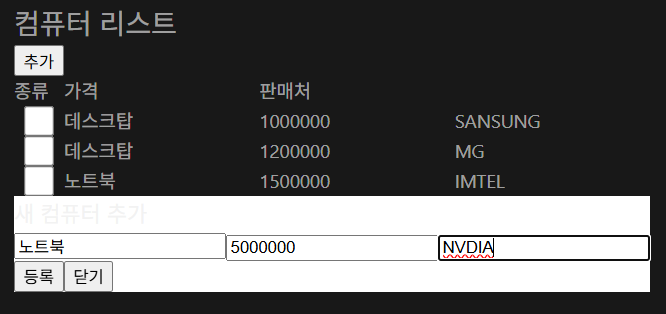
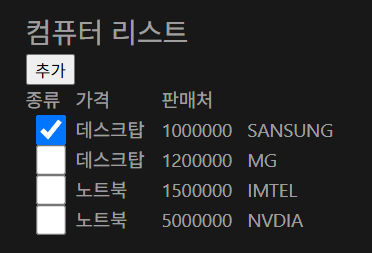
<script setup>
import {ref, reactive} from 'vue'

// 컴퓨터 목록
const computers = ref([
    {type: '데스크탑', price: 1000000, seller: 'SANSUNG', checked: false},
    {type: '데스크탑', price: 1200000, seller: 'MG', checked: false},
    {type: '노트북', price: 1500000, seller: 'IMTEL', checked: false},
])

// 모달 상태
const showModal = ref(false)

// 컴퓨터 정보
const newComputer = reactive({
    type: '',
    price: '',
    seller: ''
})

// 추가 함수
function addCom() {
    if (newComputer.type && newComputer.price && newComputer.seller) {
        computers.value.push({
            type: newComputer.type,
            price: Number(newComputer.price),
            seller: newComputer.seller,
            checked: false
        })

        // 입력 초기화, 모달 닫기
        newComputer.type = ''
        newComputer.price = ''
        newComputer.seller = ''
        showModal.value = false
    } else {
        alert('모든 항목 입력해주세요');
    }
}
</script>
<template>
    <div class="p-4">
        <h2>컴퓨터 리스트</h2>
        <button @click="showModal=true">추가</button>

        <!-- 표 영역 -->
        <div style="display: grid;grid-template-columns: 40px 1fr 1fr 1fr;">
            <div>종류</div>
            <div>가격</div>
            <div>판매처</div>
        </div>
        <div v-for="(item, i) in computers" :key="i" style="display: grid;grid-template-columns: 40px 1fr 1fr 1fr;">
            <input type="checkbox" v-model="item.checked">
            <div>{{ item.type }}</div>
            <div>{{ item.price }}</div>
            <div>{{ item.seller }}</div>
        </div>

        <!-- 모달창 영역 -->
        <div v-if="showModal">
            <div style="background-color: white">
                <h3>새 컴퓨터 추가</h3>
                <input v-model="newComputer.type" placeholder="종류">
                <input v-model="newComputer.price" placeholder="가격">
                <input v-model="newComputer.seller" placeholder="판매처">
                <div>
                    <button @click="addCom">등록</button>
                    <button @click="showModal = false">닫기</button>
                </div>
            </div>
        </div>
    </div>
</template>'웹 개발 > Vue' 카테고리의 다른 글
| [Vue3] 랜더링 문법(v-if, v-show) (0) | 2025.05.19 |
|---|---|
| [Vite] 설정, 프로젝트 생성 (0) | 2025.05.19 |
| [Vue3 comp] input, 숫자 증감 예제 (0) | 2025.05.15 |
| [Vue3] ref(), reactive() (0) | 2025.05.15 |
| [Vue3] npm run dev 실행되지 않을 때 (0) | 2025.05.15 |